Tutorials5 min read
Free Shot List Template (CSV) and How to Fill It In
Download a free shot list template for film, series and commercials: every column a shot list needs, a filled-in example, and how to fill it in shot by shot. Opens in Excel, Google Sheets and Numbers.
A shot list is the plan of every shot in a scene, in order, in one table. It is the quickest planning document to write and to change, which is why it usually comes before the storyboard. This page gives you a free template, a filled-in example and a column-by-column guide to filling it in.
Download the template
- Blank shot list template (CSV): every column, with episode, sequence and shot numbers ready for two sequences.
- Filled-in example (CSV): the first two sequences of a sample pilot, written out shot by shot.
Both are plain CSV files. They open in Excel and Numbers directly; in Google Sheets choose File, Import, Upload and create a new spreadsheet. They are free for any project.
The columns, and what goes in each
| Column | What to write | Example |
|---|---|---|
| Episode | The episode the shot belongs to | EP01 |
| Sequence | A group of shots in one place and time | SEQ_001 |
| Shot | The shot's number inside the sequence | 03 |
| Shot size | How much of the subject is in frame | Close-up |
| Angle | Where the camera is relative to the subject | Slight low |
| Camera movement | What the camera does during the shot | Slow push-in |
| Lens | The focal length you are aiming for | 85mm |
| Description | One line: what happens in the shot | Maren speaks into a handheld radio |
| Characters | Who is in frame | Maren |
| Location | Where the shot takes place | Harbour |
| Dialogue and sound | Lines and the sounds that matter | Radio line; radio crackle |
| Duration (s) | How long the shot should run | 4 |
| References | The pictures the shot must match | Maren turnaround |
| Status | Where the shot stands | In review |
| Notes | Anything that does not fit elsewhere | Time to the line |
Number shots inside each sequence (01, 02, 03) rather than across the whole film. When a shot is added or cut, only one sequence renumbers.
Shot sizes and movements, in one line each
Sizes: extreme wide (the place), wide (the whole body in the place), medium (waist up), close-up (the face), extreme close-up (a detail), insert (an object that tells the story).
Movements: static, pan (turns left or right), tilt (up or down), push-in or pull-out (moves towards or away), tracking (moves alongside), handheld (follows loosely), crane (rises or falls).
Write sizes and movements with the same words every time. "CU" in one row and "close" in the next is how a shot list stops being searchable.
The example, shot by shot
The example file follows the opening of Kestrel Bay, a sample series we made in Cinemagiq to show the product. The first sequence, the harbour at dawn, reads like this:
| Shot | Size | Movement | Description | Length |
|---|---|---|---|---|
| 01 | Extreme wide | Static | The harbour in morning fog, the lighthouse faint on the cliff | 3 s |
| 02 | Wide | Slow push-in | Maren on the quay, looking out at the lighthouse | 2.5 s |
| 03 | Close-up | Static | Maren speaks into a handheld radio | 4 s |
| 04 | Medium wide | Pan right | Theo steps off the old coastal bus onto the wet cobbles | 2.5 s |
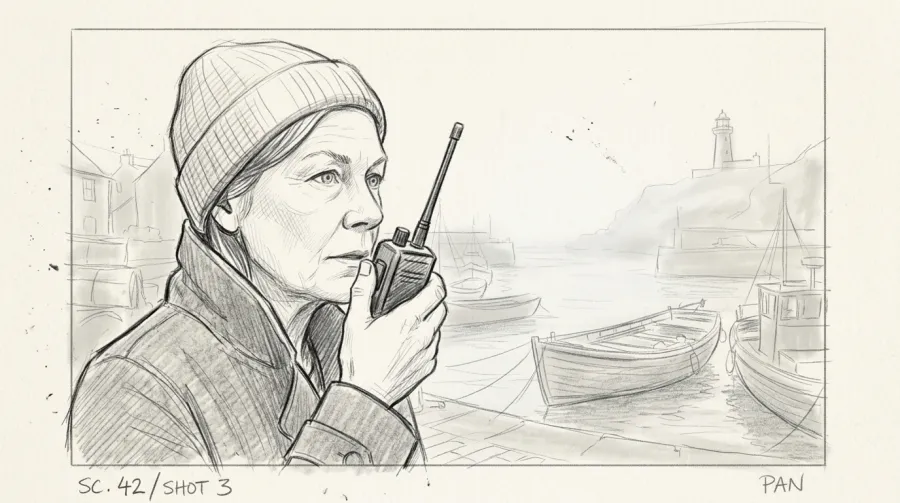
Notice what the list does not say: no lighting plan, no costume notes, no paragraphs. Those live in the script and in the references. The list only says what must be made, so it stays short enough to read at a glance.
How to fill it in
- Go through the script scene by scene. Every time the picture has to change (a new angle, a new subject, a cut in time), start a new row.
- Write the description first. One line of action per shot. Size, angle and movement follow from what the shot needs to show.
- Add who and where. Characters and location tell you which references every shot needs.
- Guess the length. Rough is fine; the animatic corrects it.
- Mark references. Name the turnaround, the location sheet or the prop each shot must match. In AI production this column is what keeps a character the same from shot to shot (see character turnaround sheets).
- Use the status column as a tracker. Not started, In progress, In review, Approved. A shot list with statuses is a production tracker.
Shot list, storyboard, animatic
The three documents plan the same shots in different ways:
- The shot list says what each shot is, in words.
- The storyboard draws the shots that need a picture to be understood.
- The animatic times the storyboard to sound, so you know how long each shot really runs.
Write the list first, draw from it, time the drawings, then update the list with the lengths the animatic found. More in the AI storyboarding guide.
When a spreadsheet stops being enough
A spreadsheet works for one scene and one person. It gets hard when a series has hundreds of shots, several people change them, and every row needs pictures: the storyboard, the keyframe, the clip, each in several versions. Then the list and the files drift apart.
In Cinemagiq the shot list is the Production Board: episodes, sequences and shots as rows, with columns you name yourself, statuses in every cell, and the storyboard, keyframe and clip of each shot in the same row. Steve, the project's AI agent, can turn a script or a shot list into board rows for you; he proposes the sequences and shots as a plan, and nothing changes until you approve it.
Frequently asked questions
What should a shot list include?
At minimum: scene or sequence, shot number, shot size, angle, camera movement, a one-line description and the characters in it. Most productions add lens, location, dialogue and sound, intended length, references and a status column so the list doubles as a tracker.
Is this shot list template free?
Yes. Both files are free to download and use for any project, personal or commercial. They are plain CSV files, so they open in Excel, Google Sheets, Numbers or any spreadsheet app.
How do I open the template in Google Sheets?
In Google Sheets choose File, then Import, then Upload, and pick the CSV file. Choose to create a new spreadsheet. In Excel or Numbers, open the file directly.
What is the difference between a shot list and a storyboard?
A shot list describes every shot in words, in a table. A storyboard draws them. Most productions make the shot list first, because it is quick to change, and then draw panels for the shots that need a picture to be understood.
How detailed should a shot list be?
Detailed enough that someone who was not in the planning meeting could make the shot. One line of action, the size and the movement are usually enough; long paragraphs belong in the script or the notes column.